
jan11 Game Download For Really Earning Apk in Pakistan 2026
today
7MB
V3.2.1
Android 8+
343552
Description
Finding a suitable Android gaming application can take some time, especially when many new apps appear every year. Before installing any APK, users should check how the application works, what features it provides, which Android versions it supports, and whether its services are available in their region. jan11 Game is one of the mobile gaming platforms searched by Android users in Pakistan who want to explore different game categories from a single application.
The platform focuses on mobile accessibility and provides a straightforward interface for navigating its available sections. Depending on the current version, users may find different entertainment games, account features, promotional activities, and wallet-related options. Payment methods such as JazzCash and Easypaisa may also be available, depending on the platform and current version. However, features and payment methods can change, so users should always check the latest information provided by the platform before making any transaction.
This guide explains jan11 Apk Download, installation, registration, login, available features, payment options, bonuses, referral options, security tips, and other important information in simple language.
What Is jan11 Game?
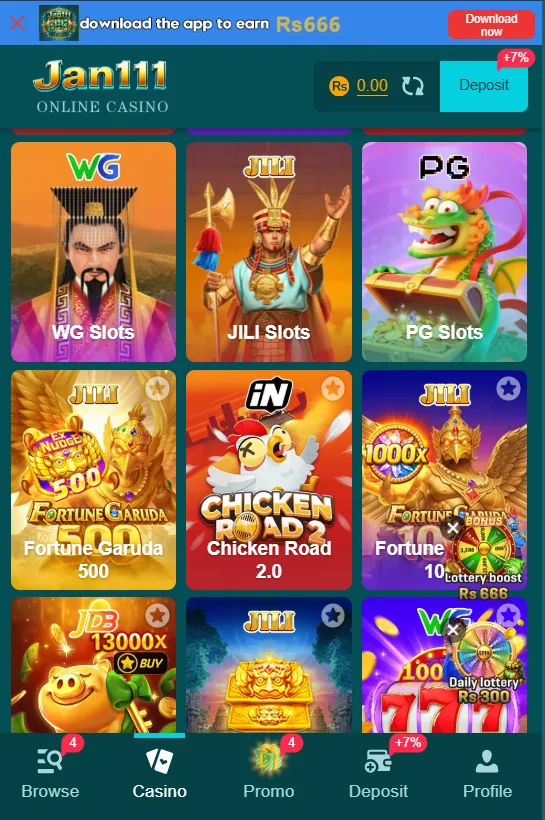
jan11 Game is an Android-based gaming platform that brings multiple entertainment options together through a mobile-friendly interface. Users can create an account, access the available game sections, manage their profile, and check wallet-related features from within the application.
The application is mainly aimed at smartphone users who prefer using Android devices. Its simple navigation can make it easier for beginners to understand the main menus without spending too much time learning the interface.
you can also try: NB999 Game
Because APK applications can be updated frequently, the exact games, promotions, payment methods, and requirements may differ between versions. It is therefore better to confirm current details before registering or making any transaction.
Main Features of jan11 Game
Easy-to-Use Mobile Interface
One of the important aspects of a mobile application is how quickly users can understand its layout. jan11 Apk uses a straightforward design where major sections can be accessed from the main interface. This can make navigation easier for both new and returning users.
Multiple Gaming Sections
The platform may provide several categories depending on the version currently available. Having different sections in one application allows users to explore various styles of mobile entertainment without installing multiple applications.
Android-Friendly Performance
jan11 Apk is designed for Android smartphones and can work on many compatible devices. Performance may depend on your phone’s RAM, Android version, storage space, and internet connection. Keeping the application updated can also help with compatibility.
Account Management
After registration, users can access account-related settings from the application. These may include profile information, password management, wallet details, transaction history, and other account options depending on the current version.
Local Payment Options
For Pakistani users, payment convenience is an important consideration. JazzCash and Easypaisa may be available for supported transactions, depending on the platform’s current services and account eligibility. Always verify the payment method and recipient details before confirming a transaction.
Regular Updates
Application updates can introduce performance improvements, bug fixes, security changes, and compatibility improvements. Users should check whether a newer official version is available instead of continuing to use an outdated APK.
Customer Support
If you experience a login, account, payment, or technical problem, use the support channels provided by the platform. Avoid giving your password, OTP, or other sensitive account information to unofficial individuals claiming to provide support.
jan11 Game Download for Android
Before downloading an APK, check that your phone has sufficient storage and a stable internet connection. It is also important to verify the source of the file because modified APKs can create unnecessary security risks.
Steps to Download jan11 Game APK
- Open the trusted download page where the latest version is available.
- Check the APK version and basic installation information.
- Tap the download button.
- Wait until the APK file has completely downloaded or vipmega.com.pk
- Open the downloaded file from your phone’s Downloads folder.
- If Android asks for installation permission, review the setting carefully.
- Start the installation process.
- Wait for the installation to finish.
- Open jan11 Game and check whether an update is available.
- Use the latest compatible version whenever possible.
Important: Avoid APK files that have been modified, repackaged, or shared through unknown links. A trusted source is generally preferable to an unfamiliar download page.
How to Install jan11 Game APK?
Android may restrict APK installation when the file does not come through the Play Store. If your phone blocks the installation, check the relevant Android permission for the browser or file manager you used.
After permission is granted, return to the downloaded APK and select Install. Once installation is complete, open the application and review its initial settings.
If the installation fails, check your available storage, Android compatibility, APK integrity, and whether an older version is already installed.
jan11 Game Registration Process
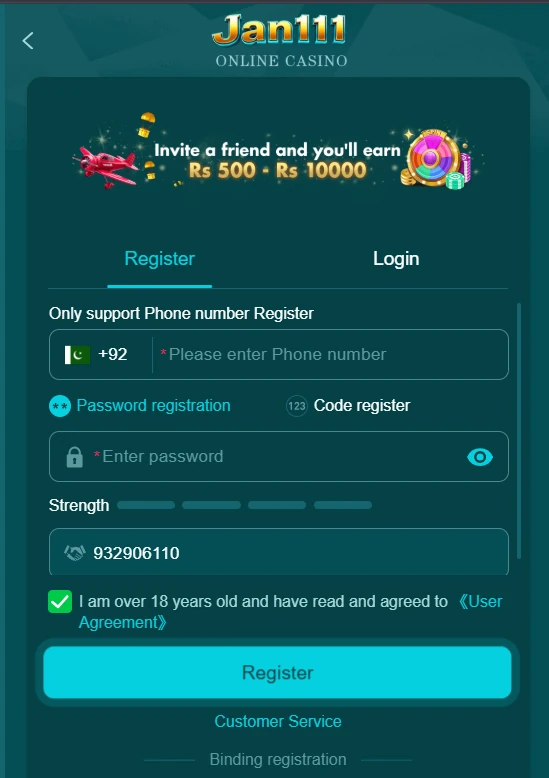
Creating an account is normally the first step after installing the application. The exact registration fields can vary between versions.
How to Register
- Launch the jan11 Game application.
- Select Register or Sign Up.
- Enter the requested mobile number or username.
- Create a strong password.
- Enter a referral code only if you have a valid one.
- Complete any verification requested by the platform.
- Read the available terms and privacy information.
- Submit the registration form.
- Save your login information securely.
Use accurate information during registration to avoid potential account verification problems later.
jan11Game Login Guide
Once your account has been created, logging in should be straightforward.
- Open the application.
- Select Login.
- Enter your registered username or mobile number.
- Enter your password.
- Complete any verification step if requested.
- Tap the login button.
Never share your password or verification codes with another person. If you cannot access your account, use the official recovery or support option rather than relying on an unknown third party.
How to Use the jan11 Game Wallet?
If the current version includes wallet functionality, users should carefully review all transaction instructions before adding or withdrawing funds.
Adding Funds
The general process may include:
- Sign in to your account.
- Open the wallet or deposit section.
- Select an available payment method.
- Choose JazzCash, Easypaisa, or another supported option.
- Enter the required amount.
- Check the account and payment details.
- Confirm the transaction.
- Wait for the balance to update.
Payment availability can vary according to region, account status, and current platform policies.
Withdrawal Process
If withdrawals are available and your account meets the requirements:
- Open the wallet section.
- Select the withdrawal option.
- Choose a supported payment method.
- Enter the amount.
- Confirm your account information.
- Submit the request.
- Wait for processing.
Always check the minimum withdrawal amount, verification requirements, processing time, and applicable terms before submitting a request.
Bonuses and Promotional Offers
jan11 Game may provide promotional activities depending on the current version and campaign schedule. Examples can include:
- Welcome offers for eligible new accounts
- Daily login or check-in activities
- Referral rewards
- Limited-time campaigns
- Special event promotions
- Loyalty-related benefits
- Activity-based rewards
Promotions should not be viewed as guaranteed income. Each offer can have separate eligibility conditions, wagering or usage requirements, expiry dates, and withdrawal rules. Read the terms before participating.
Why Pakistani Android Users May Search for jan11Game
Mobile users in Pakistan often prefer applications that are easy to access from smartphones and support familiar local payment methods. The availability of services such as JazzCash and Easypaisa can make an application more convenient where those options are officially supported.
Another factor is the simple mobile interface. Users generally prefer an application where registration, account settings, gaming sections, and wallet options are not difficult to locate.
However, convenience should not replace basic safety checks. Before installing 7A, users should confirm the APK source, check permissions, review current terms, and understand the available services.
How to Install jan11 Game Download Latest Version on Android?
- Download the latest jan11 Game APK from a trusted source.
- Open the downloaded APK file.
- Allow the required installation permission if Android requests it.
- Tap Install.
- Wait for the installation to finish.
- Open the application.
- Register a new account or log in to an existing account.
- Check the application for available updates before using its features.
Referral Program
If a referral feature is active in your version of jan11 Game, you may find a referral section inside your account.
The basic process can include:
- Log in to your account.
- Open the referral or invitation section.
- Copy your personal referral code or link.
- Share it with people who are genuinely interested.
- Ask new users to complete the required registration steps.
- Check the referral dashboard for status updates.
- Review the reward conditions before expecting any benefit.
Do not use spam messages or misleading claims when sharing referral links. Referral rewards are subject to the platform’s current rules.
Security Tips Before Using jan11 Game
| Download from a source you trust. | Review requested permissions. |
| Avoid modified APK files. | Avoid logging in through suspicious links. |
| Keep Android updated. | Keep transaction records. |
| Use a unique and strong password. | Check the latest terms before making payments. |
| Never share OTPs or passwords. | Contact official support for account problems. |
Responsible Use of Gaming Apps
If an application includes features involving money, set a personal spending limit before using them. Do not use money required for household expenses, education, bills, or other essential needs.
Taking breaks is also useful. Avoid continuing to spend simply because you have experienced a loss, and never assume that previous results guarantee future outcomes. Treat gaming as entertainment rather than a dependable source of income.
jan11 Game Pros and Cons
Pros
- Simple Android-focused interface
- Multiple gaming sections in one application
- Easy account navigation
- Local payment methods may be available
- Suitable for users looking for mobile gaming options
- Regular updates may improve compatibility
Cons
- Requires a reliable internet connection
- APK installation may require additional Android permission
- Features can change between versions
- Promotions may have specific eligibility requirements
- Payment options may not be available to every user
- Users need to verify APK sources before installation
My Overview of the Jan11 Game Application
Jan11 Game presents a mobile-oriented interface that brings different sections and account options together in one place. Android users can explore the available menus, review the displayed game categories, and check the account settings through their smartphones.
The overall experience may depend on several factors, including device compatibility, internet connectivity, available storage, and the Android version. Some devices may provide smoother navigation than others, so users should check the application’s requirements before installation.
Account security also deserves attention. Users should review the privacy information, understand the platform’s terms, and protect their login credentials. They should also examine payment details and transaction conditions carefully before considering any money-related feature.
Is jan11 Game APK Safe?
There is no universal guarantee that every APK file available online is safe. The source of the APK is one of the most important factors to consider. Users should avoid unknown modified versions and carefully review the permissions requested during installation.
Before installing, check the file source, application version, permissions, and available information. If anything looks unusual, it is better to stop the installation and verify the source first.
Common Problems and Their Solutions
APK Is Not Installing
Make sure there is enough free storage and that your Android version is compatible. A damaged or incomplete APK can also cause installation problems.
Download Is Too Slow
Check your internet connection and try downloading again from a reliable source. Avoid repeatedly downloading incomplete files.
App Is Not Opening
Restart your device and check whether the application requires an update. If the problem continues, verify Android compatibility.
Login Is Not Working
Recheck your username, mobile number, and password. If you have forgotten your credentials, use the official recovery option.
Payment Is Pending
Payment processing can take time depending on the selected method and platform requirements. Check your transaction history before submitting the same payment again.
Frequently Asked Questions
Yes, if your device meets the application’s current Android requirements and you have a compatible APK file.
JazzCash may be available for supported transactions, but users should confirm its availability inside the current application before making a payment.
Easypaisa may also be supported depending on the current platform and account. Always verify the available payment options before depositing.
Account requirements depend on the features you want to use. Registration is generally required for personalized account and wallet-related functions.
Normally, an application update does not require a new account. Existing users can generally continue using their current login details, provided the account remains supported.
Use the official source whenever one is available. If you use another website, verify the source carefully and avoid modified or suspicious APK files.
Conclusion
jan11 Game offers a mobile-based gaming experience with different entertainment categories and account-related options. Its interface allows users to navigate available sections and review the features presented within the application.
Before installing the app, check its download source, device compatibility, privacy policy, and updated terms of service. Also, review the available payment methods and transaction conditions rather than relying on claims from third-party websites.
Users should protect their personal information, avoid sharing account credentials, and carefully review every feature before using it. Remember that promotional offers do not guarantee financial returns, and responsible decisions should always come first.